
Land Claim
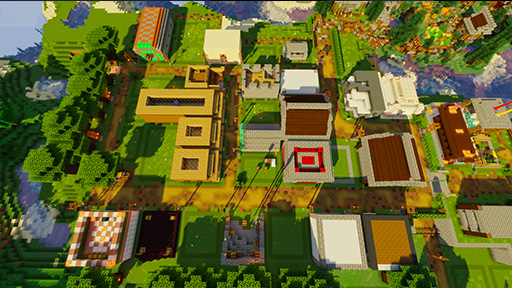
On PickaxeMania, you have the option to “claim” land in order to protect your builds. When you claim a section of land, it becomes completely protected, preventing other players from placing or breaking blocks, harming animals, harvesting crops, or accessing chests within that area.
To claim land, you’ll need two essential tools: a golden shovel for modifying claims and a stick for viewing claim information. You can either craft these items yourself or use the command “/claim” to receive them for free.
There is no limit to the number of claims you can create, but there is a restriction on the total number of blocks you can claim. Each player starts with an initial allowance of 500 “claim blocks,” and if needed, additional claim blocks can be purchased using in-game currency through the “/buyclaimblocks” command.

Creating a Claim
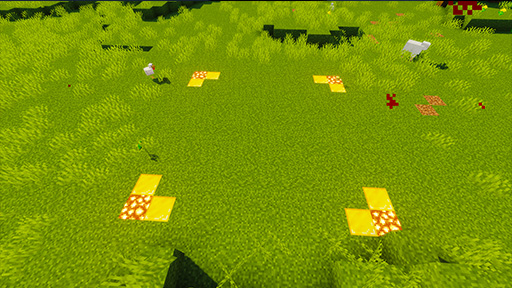
Before creating any claim, we should check if there are other claims by other players nearby. Claims by different people should be at least 100 blocks apart unless both parties discuss otherwise. To do this, hold a stick in your hand and shift + right click to visualize all nearby claims. Claims are visualized using dotted lines of gold blocks, so look around for any dotted lines on the ground around you.
Once you’ve confirmed that there are no claims too close, we can begin claiming! All claims are rectangles, so don’t worry about the Y axis (height) of your claim, claims automatically expand up and down as you build. Just focus on drawing a rectangle that surrounds your entire home. Get an idea of where the corners of this rectangle should be.
Useful Commands
| /unclaim | Remove a protection |
| /claimslist | List all of your protections |
| /subdivide | Create claims within your main claim that you can trust people to |
| /restrictsubclaim | Sets subclaim NOT to inherit permissions from the parent claim |
| /kickfromclaim [player] | Kick a player outside of your claim |
| /petkick | Enter pet kicking mode (right-click pets you don’t want in your claim) |
Trusting Others
| /trust [player] | To give someone full access to your claim (break, build, access chests, etc) |
| /containertrust [player] | List all of your protections |
| /containertrust [player] | Give someone access to chests in your claim |
| /permissiontrust [player] | Give someone the ability to trust and untrust others in your claim |
| /accesstrust [player] | Give someone access to doors and trapdoors in your claim |
| /trust [player] | Allow someone to build and use chests within your claim |
| /trustlist | See who is trusted in your claim |
| /untrust [player] | Remove a player from your protection |
You can add other players to your protected area with various levels of access. To trust everyone on the server replace [player] with “all”. This works with all of the commands below.
To give someone full access to your claim (break, build, access chests, etc) do:
/trust [player]
To give someone just the ability to access storage items, but NOT build, do:
/containertrust [player]
To give someone visitor access (opening the doors, but not take anything or build anything) do:
/accesstrust [player]
To give someone permission to manage your claim (trusting other players) do:
/permissiontrust [player]
Resizing Your Claim
You can make your claim bigger or smaller any time by using a golden shovel. The process is similar to creating the claim. To make things easier, start by right clicking within the claim with a stick. This will show the border of the claim so you can see where the corners are.
To resize a claim, right click a corner you would like to move. Then, right click again wherever you would like to move that corner to. To make things easier, you don’t need to right click the actual block, you can just point your crosshair at the block and right click from a distance.
Subdividing Claims
Subdividing claims allows you to give players access to specific parts of your claim. This is the best way to manage a town or shop!
The idea behind subdivisions is easy. You are creating mini-claims within your main claim so that you can trust people to certain areas, but not the entire claim. You are still in control of the border of these mini-claims (size and location). Once a subdivision is created you can trust people the same way as before. Just stand in the mini-claim and use the trust commands. It will only trust them to the mini-claim. (To trust someone to your main claim you will need to stand outside of any mini-claims you’ve created.)
To create a subdivision you need to go into “subdivision mode”. You can access this mode with /subdivideclaims. Once you are in this mode you can create the subdivisions the same way you would make a regular claim, just right click two corners. Subdivisions will be outlined with a white dotted line. To leave subdivision mode use /basicclaims.